


Contracts and invoices are the backbone of a professional photography business, yet they are also where many photographers feel the most friction. Chasing signatures, tracking payments, and piecing together paperwork from different tools wastes time and creates stress. When these essential tasks are disorganized, both you and your clients feel the strain.
Iris Works brings contracts and invoices into one connected system, making them fast to send, easy to track, and simple for clients to complete. This guide walks through how to create, send, and manage contracts and invoices so you stay professional and get paid on time.
Why Contracts and Invoices Matter
A clear contract protects both you and your client. It sets expectations, defines what is included, outlines payment terms, and provides legal protection if a disagreement arises. Skipping contracts leaves your business exposed and can lead to misunderstandings that damage relationships.
Professional invoicing matters just as much. It ensures you get paid the correct amount on time, presents your business as organized and trustworthy, and gives you a clear record of your income. Together, contracts and invoices form the professional foundation every photography business needs.
Step 1: Create Your Contract Templates
Start by building your contract templates in Iris Works. Rather than writing a new contract for every client, you create a reusable template that includes your standard terms, and then customize the specific details for each booking. If you offer different session types, you can create separate templates so the terms always match the service.
Having your contracts ready as templates means sending a professional agreement takes moments instead of the lengthy process of drafting one from scratch each time.
Step 2: Set Up Your Invoice Templates
Next, create your invoice templates with your packages, pricing, and payment terms. You can build invoices for your standard offerings so that billing a client is as simple as selecting the right package. Clear, itemized invoices help clients understand exactly what they are paying for and reduce questions.
With templates in place, you avoid the errors and inconsistencies that come from creating each invoice manually, and your billing looks polished and uniform every time.
Step 3: Send Contracts for Electronic Signature
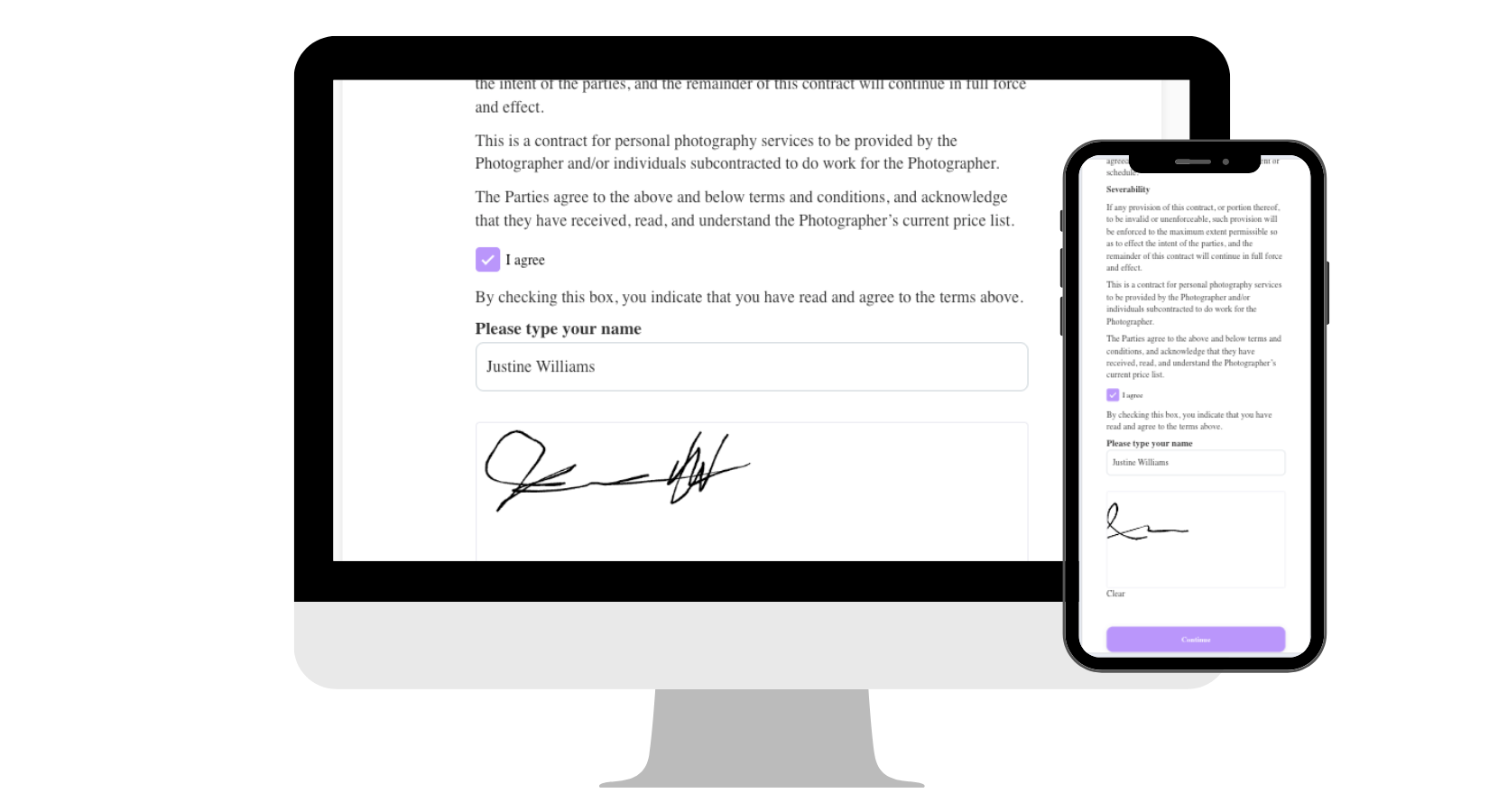
When it is time to book a client, you can send the contract directly from Iris Works for electronic signature. The client receives it, reviews the terms, and signs online from any device. There is no printing, scanning, or mailing involved, which makes the process fast and convenient for everyone.
Electronic signatures speed up booking dramatically. A client can sign within minutes of deciding to move forward, which secures the booking while their enthusiasm is high.

Step 4: Send Invoices for Online Payment
Alongside or after the contract, you can send an invoice that clients pay online. Whether you are collecting a deposit to secure the date or the full balance, clients can pay quickly and securely without the friction of mailing a check or arranging another payment method.
Making payment easy directly improves your cash flow, because clients are far more likely to pay promptly when doing so takes only a few clicks.
Step 5: Track Everything in One Place
One of the biggest advantages of managing contracts and invoices in Iris Works is visibility. You can see at a glance which contracts have been signed and which invoices have been paid, all tied to each client's record. No more searching your inbox or wondering whether a payment came through.
This clear tracking eliminates the anxiety of losing track of paperwork and payments. You always know exactly where each client stands financially and legally, which is essential for running a professional business.
Step 6: Automate Reminders for Unpaid Invoices
Chasing late payments is uncomfortable and time consuming. Instead of manually following up, you can set up automated reminders for outstanding invoices. These gentle nudges reach clients automatically when a payment is approaching or overdue, prompting them to pay without an awkward personal conversation.
Automated payment reminders keep your cash flow healthy and remove one of the most unpleasant administrative tasks from your plate entirely.
Connecting Contracts and Invoices to Your Workflow
The real power comes from connecting contracts and invoices to your broader workflow. When a client books, the contract and invoice can be sent automatically as part of the process, so booking, signing, and paying flow together seamlessly. This integration turns what used to be several manual steps into a single smooth experience.
By building these documents into your workflow, you ensure that no booking is ever incomplete. Every client signs and pays as part of the natural process, without you having to track and prompt each step by hand.
Best Practices for Photography Contracts
A strong contract does more than protect you legally. It sets clear expectations that prevent misunderstandings before they happen. Make sure your contract covers the essentials: what is included in the session, the total cost and payment schedule, your cancellation and reschedule policy, how and when images will be delivered, and the usage rights for the photographs. Clarity in these areas heads off the most common disputes.
Write your contract in plain, approachable language rather than dense legal jargon. Clients are more likely to read and understand a contract that feels human, and a contract they understand is one they are more likely to honor. If your terms are clear and fair, signing feels like a natural step rather than an intimidating hurdle.
It is also wise to have your contract reviewed by a legal professional to ensure it holds up in your area and covers your specific business. Once you have a solid contract, save it as a template so every client receives the same thorough protection. Keeping your contracts consistent and professional protects your business on every booking while making you look organized and trustworthy to clients.

Why Professional Paperwork Builds Trust
The way you handle contracts and invoices shapes how clients perceive your entire business. When a client receives a polished, easy to sign contract and a clear, professional invoice, they feel confident that they are working with an established, trustworthy photographer. Sloppy or disorganized paperwork, by contrast, plants doubt even when your images are excellent.
Smooth paperwork also reassures clients that their investment is protected and that the process will be handled with care. A clear contract shows that you take their booking seriously and that expectations are mutual, while a simple online payment experience signals that you respect their time. These small moments of professionalism accumulate into a strong overall impression.
In a competitive market, this kind of trust is a genuine advantage. Clients are often choosing between several talented photographers, and the one whose process feels the most professional and reassuring frequently wins the booking. By handling your contracts and invoices with polish and consistency, you not only protect your business and get paid on time, you also strengthen the trust that leads to bookings, referrals, and lasting client relationships.
How Iris Works Solves the Paperwork Problem
The frustration of contracts and invoices almost always comes down to disorganization and manual effort. Iris Works solves this by centralizing everything in one system that is built for photographers. Your templates are ready to send, signatures and payments happen online, everything is tracked automatically, and reminders handle the follow up for you.
The result is a professional, reliable process that protects your business and gets you paid on time, without the stress of managing it all manually. Instead of dreading paperwork, you can trust that your contracts and invoices are handled, which frees you to focus on your clients and your craft.
Frequently Asked Questions
How do I send a contract for signature in Iris Works?
In Iris Works, you create a contract template with your standard terms, customize the details for the booking, and send it directly for electronic signature. The client reviews and signs online from any device, with no printing or scanning required.
Can clients pay invoices online through Iris Works?
Yes. Iris Works lets you send invoices that clients pay online, whether it is a deposit to secure the date or the full balance. Easy online payment improves your cash flow because clients can pay in just a few clicks.
How does Iris Works help me track which invoices are paid?
Iris Works ties every contract and invoice to the client's record and shows at a glance which contracts are signed and which invoices are paid. You always know where each client stands without searching your inbox.
Can Iris Works remind clients about unpaid invoices automatically?
Yes. Iris Works lets you set up automated reminders for outstanding invoices, so gentle nudges reach clients when a payment is approaching or overdue. This keeps your cash flow healthy without awkward manual follow up.
Recent posts