


With your data centralized and your ideal client journey mapped out, you’re ready to bring that vision to life. The next steps are where the magic really happens, turning your blueprint into an automated, efficient reality that your entire team can rely on. Let’s complete the implementation process.
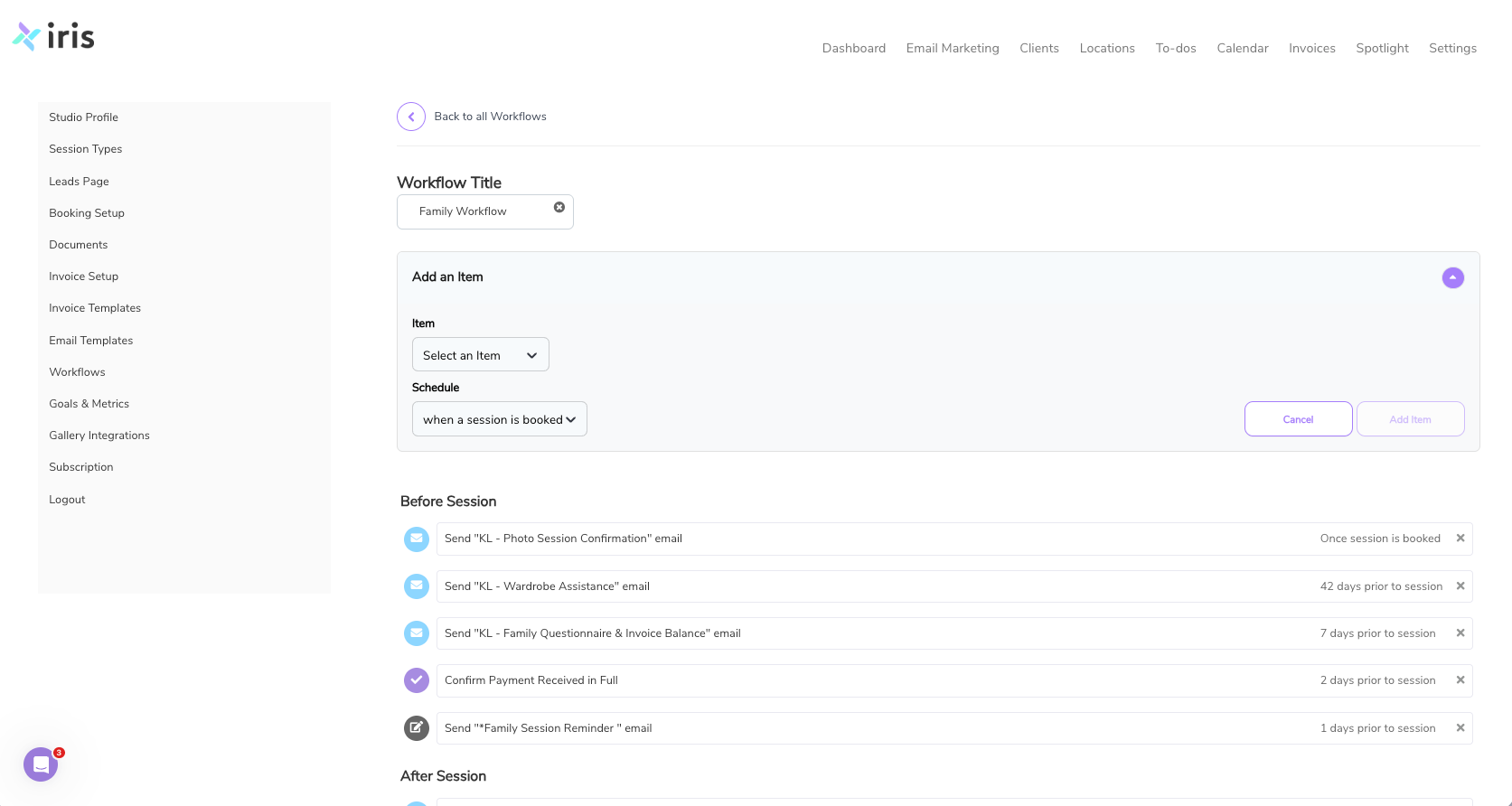
Step 4: Configure Your First Automated Workflows
This is the most powerful step. An automated workflow is a series of actions such as emails, questionnaires, and reminders that the CRM performs for you based on specific triggers. Instead of trying to automate your entire business at once, start with the two most impactful areas: new inquiries and booked clients.
Using the ideal client journey you designed in Step 2, build your "New Inquiry" workflow. In Iris Works, this is incredibly intuitive. You’ll set a trigger, such as "New Lead Created." Then, you’ll add the first action: send a welcome and brochure email immediately.
You can create email templates directly within the system so your branding stays consistent. Next, add a follow-up task like creating a reminder to call the lead in two days if there is no response.
Now build your "Booked Client" workflow. The trigger could be a signed contract or paid invoice. The first action is sending a welcome packet and client questionnaire.
From there, add timed steps:
Send a session prep guide a few days before the session
Send a gallery delivery email after the session
Starting with just these two workflows will immediately save hours and reduce missed steps. You are not just saving time. You are creating a consistent client experience.

Step 5: Train Your Team and Go Live
A tool is only as effective as the team using it. Before going live, hold a focused training session.
Do not overwhelm your team. Keep it simple:
- Photographers: how to view schedules and client notes
- Studio manager: lead tracking, workflows, invoicing
Start by running all new inquiries and bookings through the CRM for one week. Keep your old system as backup, but commit to using the new one.
This trial period helps you identify gaps, adjust workflows, and refine templates.
After a week or two, migrate all active clients into the system. Set a clear go-live date and treat it as a milestone.
Ready to see how simple this can be?
Schedule your free Iris Works demo and see it in action.
Case Example: The Transformation of Everglow Studios
Let’s make this real.
Sarah, the founder of Everglow Studios, manages three photographers and a studio manager. Before using a photography CRM, her business struggled with disorganization.
Before
- Leads came from multiple sources and were not tracked consistently
- A major inquiry was missed, costing a high-value booking
- Calendars were not synced, causing double bookings
- Client experience varied depending on the process
- Invoices were delayed, impacting cash flow
Sarah spent more time managing chaos than growing her business.
After Implementing Iris Works
Centralized Lead Management
All leads now flow into one system. Automated responses ensure every inquiry is handled immediately.
Unified Calendar
The team operates from one calendar. Bookings update automatically, eliminating conflicts.
Automated Client Journey
Every client receives a consistent experience:
- Welcome emails
- Questionnaires
- Session reminders
- Invoice and contract delivery
Sarah now spends her time focusing on growth instead of fixing problems.
Tools and Resources for a Seamless Operation
A photography CRM is the foundation of your business, but it works best when connected with the right tools.
Iris Works CRM
Your central hub for client management, scheduling, communication, and automation.
Online Gallery Platforms
Tools like ShootProof and Pic-Time allow you to deliver images professionally and integrate with your CRM.
Accounting Software
Connect Iris with QuickBooks using our integration to keep your financials accurate and up to date. Sync invoices and payments automatically so you can spend less time on manual entry and more time running your business.
Email Marketing
Use the email marketing tools within Iris to send campaigns, nurture leads, and stay connected with past clients. Keep everything in one place while maintaining consistent communication across your business.
When these tools work together, your business runs efficiently at scale.
Conclusion: Stop Managing, Start Scaling
Growth does not come from working harder. It comes from building better systems.
The challenges you are facing are not unique. They are signs your business has outgrown its current processes.
A photography CRM gives you structure, automation, and consistency. It allows your team to operate efficiently while delivering a polished client experience every time.
This is how you scale without burnout.
Take Control of Your Growing Business
Ready to simplify your workflow and grow with confidence?
Schedule your free demo and see how a photography CRM can transform your business.
Frequently Asked Questions
Can a photography CRM handle a large team?
Yes. A photography CRM is designed to support team structures with roles and permissions. Each team member can access only what they need while maintaining a centralized system
How long does it take to get started?
Most studios can get set up in a single afternoon for core workflows. Full adoption for new clients typically happens within a week.
Is client data secure?
Yes. A photography CRM uses secure, cloud-based systems with encryption. Your data is safer than scattered spreadsheets or email threads.
Will a CRM replace my other tools?
No. A photography CRM works alongside your existing tools. It acts as the central hub that connects everything together.
Is a photography CRM worth the investment?
Absolutely. One missed booking can cost more than a full year of CRM use. A photography CRM improves efficiency, client experience, and revenue.
Recent posts