


Kelvin White Balance: Demystified
Megan Al-Hassani • June 8, 2015

White balance: It’s something as a photographer you need to get right. Sure, you can make adjustments in post-processing – but why not get it right in camera? Using Kelvin White Balance is pretty simple, and will save you tons of time adjusting your white balance later.

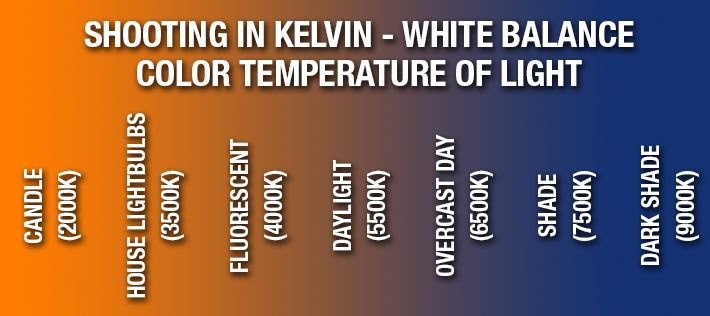
Here’s the gist – short and sweet.


Use this guide as a starting point – Write these down, memorize them, keep a picture of them in your phone. Whatever you can do to keep it handy when shooting – you’ll achieve what you want with Kelvin much faster.


A chart showing the color temperature of light in kelvin

All cameras are different – so your next step is to read your camera manual to determine how to alter your Kelvin White Balance to the above temperatures. Once you dial in your starting point, you’ll want to take a test shot to determine what, if any, adjustments you may need to make.


If your test shot looks too blue, or cool, you’ll need to adjust your Kelvin up. If your test image looks too orange, or warm, you’ll want to adjust the Kelvin down.


That’s all, folks! Now start playing around with Kelvin and you’ll see how much more creative control you can have with your work. The best part about being a photographer is that you control your own work – and using Kelvin White Balance will alllow you so much more creative control.


Share with us your images using Kelvin White Balance in the comments below!

Recent posts

Warm photography leads
By Maria Eveslage January 14, 2026
Stop relying on calls to build trust. Learn how Iris Works helps photographers warm leads with automated nurture workflows.
photography lead nurturing
By Maria Eveslage January 12, 2026
You do not need a call to build trust. Learn how photographers use Iris Works to nurture leads automatically before a consultation.
Show More