

Your Step-by-Step Plan for a Smoother Holiday Mini Session Season
Holiday mini sessions are a fantastic way to connect with clients, fill your calendar, and generate income before year's end. But they also come with challenges, back to back sessions, tight timelines, and high client expectations. The key to success? Planning ahead and using tools that help you stay organized from booking to delivery.
With Iris Works, you can streamline your holiday mini session season, automate repetitive tasks, and give your clients a professional, stress free experience from the moment they book to the moment they receive their gallery.
1. Start with a Dedicated Mini Session Calendar
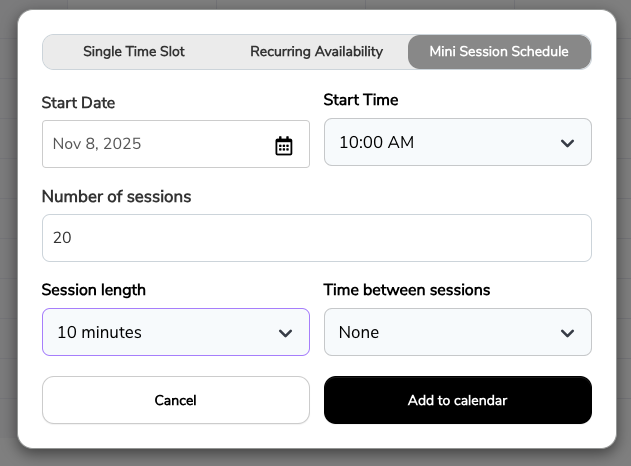
- In Iris Works, go to Booking Calendars and create a separate calendar just for your holiday minis, so it never gets mixed in with your regular session offerings.
- Set your available dates, session length, and buffer times so you don't get overbooked, especially important when minis are often scheduled back to back with little room to breathe between them.
- Add a detailed session description so clients know exactly what's included, which cuts down on the "what do I actually get" questions that tend to flood your inbox during a busy season.
2. Require Contracts and Deposits Up Front
- Attach a mini session contract to your booking calendar. This ensures every client signs before confirming, so there is no ambiguity about session terms once the day arrives.
- Use Iris Works' Invoice feature to collect a non-refundable deposit at booking. This helps reduce no shows and last minute cancellations, which are especially costly when your mini session slots are tightly packed and hard to refill on short notice.
3. Automate Communication with Workflows
Build an Iris Works Workflow that sends automatic session reminders, prep guides, and follow-ups once a client is booked.
Example:
- Booking confirmation email (sent instantly)
- Holiday styling tips email (7 days before)
- Reminder email plus text message (48 hours before)
- Thank you email with gallery link (after session)
This not only saves time but also ensures every client gets consistent, timely information, regardless of how many minis you have booked back to back that week.
4. Plan Your Client Experience
- Use Iris Works Questionnaires to gather family names, children's ages, and any special requests before the session, so you walk in already prepared instead of asking these questions on the spot.
- Include clear parking directions and arrival times in your prep guide to avoid delays, which matter even more during mini sessions where a late start can throw off your entire day.
5. Schedule Your Post-Session Workflow
- Build in editing deadlines and gallery delivery dates in Iris Works, so the post-session side of your business stays just as organized as the booking side.
- Consider sending a sneak peek email a few days after the session to keep excitement high while clients wait for their full gallery, which also tends to generate early interest in prints and products.
Make This Your Smoothest Holiday Season Yet
By setting up calendars, contracts, and automated workflows in Iris Works, you can focus on delivering an exceptional experience instead of scrambling behind the scenes. The result? Happy clients, fewer headaches, and a holiday season that's both profitable and enjoyable.
Frequently Asked Questions
How does Iris Works help keep holiday mini sessions from overlapping or overbooking?
Iris Works lets you create a dedicated booking calendar for mini sessions with set session lengths and buffer times, helping you avoid overbooking during a season when your schedule is already tight.
Can Iris Works collect a deposit and contract before confirming a mini session booking?
Yes. A mini session contract and deposit can be attached directly to your booking calendar, so clients sign and pay before their session is officially confirmed.
Does Iris Works automatically send reminders and prep information for mini sessions?
Yes. Once a client is booked, a workflow in Iris Works can automatically send a booking confirmation, styling tips, reminders, and a thank you email with the gallery link, without manual follow up.
Can I collect family details and special requests before a mini session using Iris Works?
Yes. Questionnaires in Iris Works let you gather details like family names, children's ages, and special requests ahead of time, so you can prepare before the client arrives.
How does Iris Works help manage the post-session side of mini sessions, like editing and delivery?
Iris Works allows you to build editing deadlines and gallery delivery dates directly into your workflow, helping keep the post-session process as organized as the booking process.
Recent posts