

During the fall, the difference between a smooth season and a chaotic one often comes down to one thing: your workflow. When every step of your client journey is handled manually, the busy season becomes a constant scramble. When those steps are built into an automated workflow, your business runs itself in the background while you focus on the work that matters.
A workflow is simply a defined sequence of steps that happens for every client. The magic comes when you automate those steps so they trigger at the right time without your involvement. Done well, a workflow ensures every client receives consistent, professional communication from their first inquiry to their final gallery.
Building this kind of workflow is not complicated, but it does require intention. You have to map out your process and then connect each step to an automated trigger.
This guide walks through how to build a fall photography workflow that runs itself, so your busiest season becomes your most organized one.
What a Photography Workflow Actually Is
A workflow is the structured path a client follows through your business. It is the series of communications and actions that move someone from a curious inquiry to a happy client with a delivered gallery.
Without a defined workflow, this path is improvised. You respond when you remember, send information when you have time, and handle each client a little differently. That inconsistency creates stress for you and an uneven experience for your clients.
With a defined workflow, the path is intentional and repeatable. Every client moves through the same well-designed steps, which makes your business more organized, more professional, and far easier to scale during a busy season.
Map Out Your Fall Client Journey
Before you can automate a workflow, you need to map out the journey your clients take. Lay out every step from start to finish so you can see the full picture.
A typical fall client journey looks something like this:
- A lead submits an inquiry and receives an immediate response
- The client decides to book and receives a confirmation
- A contract and invoice are sent and completed
- A preparation or styling guide goes out before the session
- A reminder is sent a day or two before the appointment
- The session takes place
- The gallery is delivered with a thank-you message
- A follow-up invites a future booking, a review, or a referral
Once you can see every step laid out, you can identify which ones can be automated. The answer, in most cases, is nearly all of them.
Automate the Inquiry and Booking Stage
The beginning of your workflow sets the tone for everything that follows. When a lead inquires, an automated response should immediately deliver your pricing, availability, and next steps. This fast reply keeps the lead engaged and reflects a professional, organized business.
Once a client decides to book, the workflow should automatically send a booking confirmation along with their contract and invoice. This removes the delay between a client saying yes and the paperwork being handled, which protects your booking and keeps momentum high.
Iris Works lets you connect these steps so that a single action, like a client booking, triggers the right communication automatically. You are no longer manually shepherding each client through the early stages.
Automate the Pre-Session CommunicationAutomate the Pre-Session Communication
The period between booking and the session is full of important touchpoints that are easy to forget when you are busy. A well-built workflow handles them automatically.
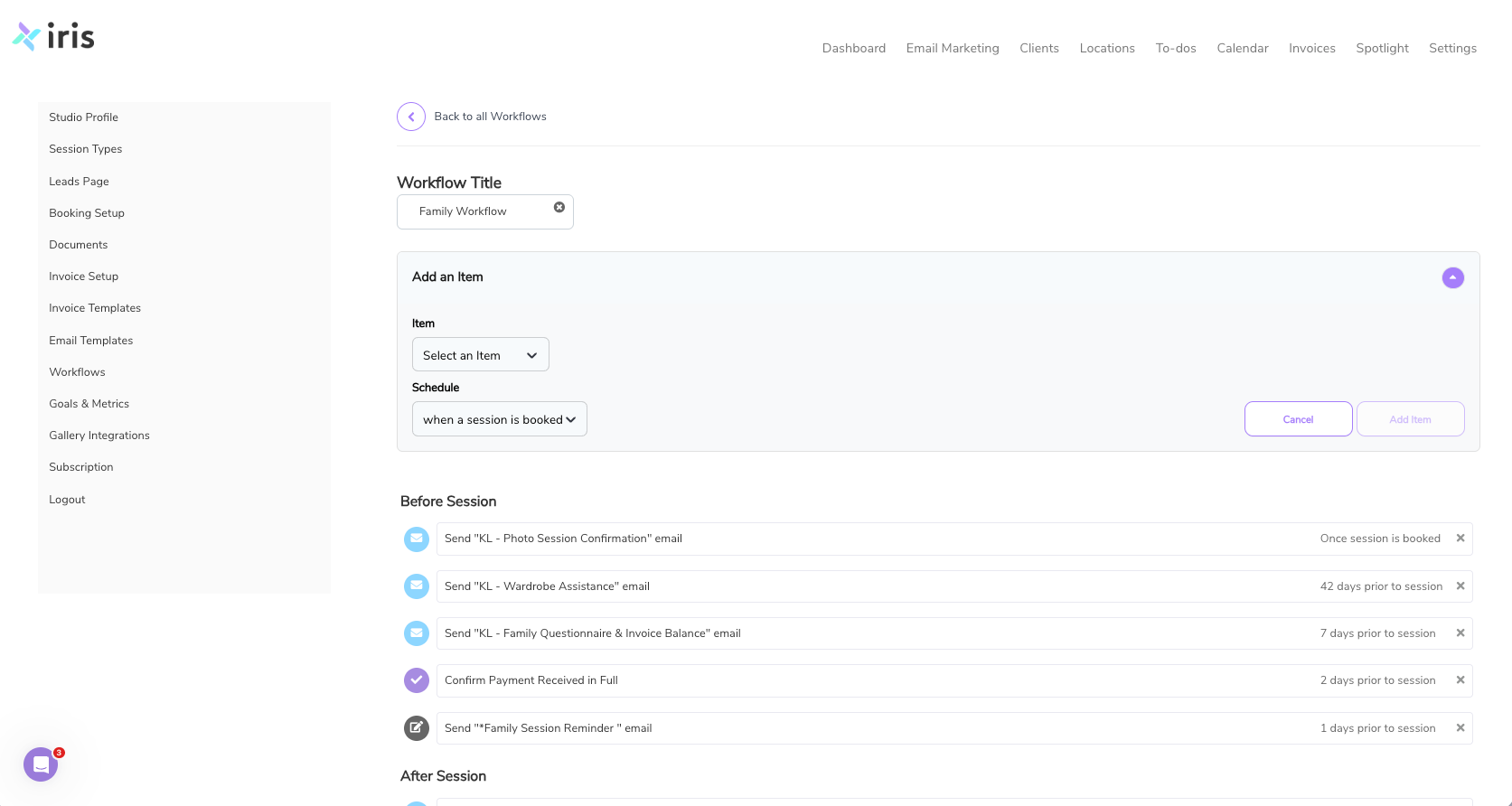
A few days before the session, your workflow can send a styling and preparation guide so clients know what to wear and what to expect. A day or two before the appointment, an automated reminder confirms the time and location and reduces the chance of a no-show.
These pre-session communications make a huge difference in the client experience. They arrive at exactly the right moment, prepare your clients thoroughly, and dramatically reduce the last-minute questions that would otherwise land in your inbox.
Automate the Post-Session Follow-Through
The work is not done when the session ends. The post-session stage is where you deliver your product and set the foundation for future business, and it should be just as automated as the rest.
After the session, your workflow can send a thank-you message that sets expectations for the gallery delivery timeline. When the gallery is ready, a delivery message shares the images and any next steps. Later, a follow-up can invite the client to leave a review, refer a friend, or book another session.
This automated follow-through ensures every client feels cared for after their session and that no opportunity for repeat business or referrals is missed. It runs quietly in the background while you move on to your next client.
Customize Workflows for Different Session Types
Not every session follows the same path. A wedding has different needs than a family session, and a mini session has different needs than a branding shoot. A strong workflow system lets you customize the sequence for each type of session you offer.
You might build a family session workflow with styling guides and reminders, a wedding workflow with timeline questionnaires and payment reminders, and a mini session workflow optimized for high volume. Each one reflects the specific journey that session type requires.
Iris Works lets photographers create separate workflows for different session types, so the automation fits the way your business actually operates rather than forcing every client into the same mold.
Keep Your Automation Sounding Human
Automation works best when it still sounds like you. One common mistake is creating robotic, generic templates that feel impersonal. The goal is the opposite: communication that feels warm and personal while being delivered automatically.
When you build your workflow, write your templates in your own voice. Let your personality and brand come through. The client should feel like they are receiving a thoughtful message from you, even though the system sent it.
This is the balance that makes automation powerful. It removes the repetitive work without removing the human connection that makes your business special.
Build It Once, Benefit All Season
The beauty of a well-built workflow is that you do the work once and benefit from it for the entire season. Instead of managing each client manually, you set up the system in advance and let it run.
By mapping your client journey, automating each stage, customizing for different session types, and keeping your communication human, you create a workflow that truly runs itself. Your fall season becomes organized, consistent, and far less stressful.
Iris Works gives photographers the tools to build these workflows in one place, turning the busiest time of year into the most efficient one.

Review and Refine Your Workflow Regularly
A workflow is not something you build once and forget. The best workflows evolve over time as you learn what works and what could be smoother. Regularly reviewing your workflow ensures it continues to serve your business well as your offerings and clientele grow.
After your busy season, take a moment to evaluate how your workflow performed. Were there points where clients seemed confused or asked repeated questions? Were there messages that felt poorly timed or missing entirely? These observations reveal exactly where to refine your workflow so it works even better next time. Small adjustments, made consistently, compound into a workflow that feels effortless and delivers an excellent client experience.
This iterative refinement is one of the advantages of a system-based approach. Because your workflow is built and documented in one place, improving it is a matter of adjusting a step rather than overhauling your entire process. Iris Works makes it easy to refine your workflows over time, so your automation grows more effective with each season and your business becomes progressively smoother to run.
Connect Every Tool Into One Seamless Flow
A workflow only runs itself when all the pieces are connected. If your booking lives in one place, your contracts in another, your invoices somewhere else, and your communication scattered across email, your workflow is held together by manual effort and prone to breaking down under pressure.
True automation comes from connecting these functions into one seamless flow. When booking, contracts, invoices, communication, and scheduling all live in a single system, a client action like booking can trigger everything that follows automatically. There are no gaps where you have to manually move information from one tool to another, and nothing falls through the cracks during your busiest weeks.
This integration is what allows a workflow to genuinely run itself. Iris Works was built specifically to bring all of these functions together for photographers, so your entire client journey flows from a single connected system. When everything is linked, the workflow you build operates smoothly end to end, freeing you from the manual coordination that so often consumes a photographer's time during the fall.
Frequently Asked Questions
What is a photography workflow?
A photography workflow is the defined sequence of steps a client moves through, from inquiry to gallery delivery. Automating those steps ensures consistent, professional communication for every client.
Which parts of my workflow can be automated?
Nearly all of it, including inquiry responses, booking confirmations, contracts and invoices, prep guides, reminders, delivery messages, and follow-ups.
Can I have different workflows for different session types?
Yes. Iris Works lets you create separate workflows for weddings, families, mini sessions, branding shoots, and more, so the automation fits each type of session.
Will an automated workflow make my communication feel robotic?
Not if you write your templates in your own voice. Good automation delivers warm, personal messages automatically, preserving the human connection while removing repetitive work.
How does a workflow help during the busy fall season?
A workflow handles your client communication automatically, so you can manage a packed calendar without scrambling to send every message manually. You build it once and benefit all season.
Recent posts