

If you find yourself writing the same emails over and over during the fall, you are not alone. Most photographers send remarkably similar messages to every client: pricing details, booking confirmations, styling guidance, reminders, and delivery notes. Writing these from scratch each time is one of the biggest hidden time drains in a photography business.
The solution is simple but transformative: build a library of email templates. When you create your most-used messages once, you can reuse them consistently for every client, saving hours and keeping your communication polished and professional.
Templates do more than save time. They ensure your messaging stays clear, consistent, and on-brand even when you are tired or rushing through a busy season. And when paired with automation, they can be sent at exactly the right moment without any effort from you.
This guide covers the essential email templates every photographer needs for fall sessions and how to put them to work automatically.
Why Templates Are Essential for a Busy Season
During the fall, your volume of client communication multiplies. Each booked session generates a series of emails, and when you are managing many clients at once, the writing adds up to hours of work.
Templates eliminate the repetition. Instead of composing each message from scratch, you start with a polished version that just needs minor personalization. This frees up significant time and mental energy for the work that actually requires you.
Templates also protect the quality of your communication. When you are busy and tired, it is easy to write a rushed or incomplete message. A well-crafted template ensures every client receives the same clear, professional communication regardless of how hectic your day has been.
The Inquiry Response Template
Your inquiry response is the first impression a potential client has of your business, and it often determines whether they book. During the fall, when leads are deciding quickly, a strong inquiry template is essential.
This template should warmly thank the person for reaching out, provide your pricing or a clear path to it, share your availability, and outline the next steps to book. It should make the person feel welcomed and confident while giving them everything they need to move forward.
When automated through Iris Works, this template can be sent the instant a lead inquires, giving you a fast, professional response even when you are unavailable.
The Booking Confirmation Template
Once a client decides to book, a confirmation template reassures them they have secured their spot and outlines what happens next. This message reduces uncertainty and sets a professional tone for the relationship.
A good confirmation includes the session date, time, and location, a summary of what is included, and a preview of the upcoming steps such as the contract, invoice, and preparation guide. It gives the client confidence that they are in good hands.
Automating this template means it goes out immediately when a client books, eliminating the awkward gap between commitment and confirmation.

The Styling and Preparation Template
One of the most common questions photographers receive is some version of what should we wear. A styling and preparation template answers this proactively and saves you from repeating the same advice over and over.
This template should cover outfit suggestions, color and coordination tips, what to bring, timing considerations, and what to expect during the session. For fall sessions specifically, you might include guidance on dressing for the weather and coordinating with the seasonal scenery.
Sent automatically a few days before the session, this template ensures every client arrives prepared, which leads to better photos and a smoother experience for everyone.
The Session Reminder Template
No-shows and scheduling confusion are frustrating and costly. A reminder template, sent a day or two before the session, dramatically reduces these problems.
Keep this template short and clear. Confirm the date, time, and location, include any last-minute notes, and express your excitement for the session. A friendly reminder reassures clients and keeps your appointment top of mind during their busy fall schedule.
When automated, reminders go out reliably for every session without you having to remember, which protects your calendar and your time.
The Gallery Delivery Template
The gallery delivery is a high point of the client experience, and your template should make it feel special. This message shares the finished images and guides the client on what to do next.
Include a warm note about how much you enjoyed working with them, clear instructions for accessing and downloading their gallery, details about ordering prints or products if you offer them, and any relevant deadlines. This is a moment of delight, so let your enthusiasm show.
Automating the structure of this message ensures every client receives a polished, complete delivery experience that reflects the quality of your work.
The Follow-Up Template
The follow-up is where you turn a one-time client into a repeat client or a source of referrals. Many photographers skip this step, but a simple follow-up template makes it effortless.
This template should thank the client again, invite them to leave a review or share their photos, and gently mention future booking opportunities. For fall clients, you might plant the seed for holiday sessions or next year's back-to-school photos.
An automated follow-up ensures this valuable step never gets forgotten, even during your busiest weeks.
Keep Your Templates Sounding Like You
The most important rule of templates is that they should still sound human. A template is a starting point, not a robotic script. Your personality and brand voice should come through in every message.
Write your templates the way you would actually speak to a client. Warm, clear, and genuine. The goal is communication that feels personal even though the structure is reused, so clients feel cared for rather than processed.
When your templates reflect your voice, automation enhances your client experience rather than diminishing it. Iris Works lets you build and automate these templates so your fall season runs smoothly while every client still feels the personal touch that makes your business special.
Organize and Maintain Your Template Library
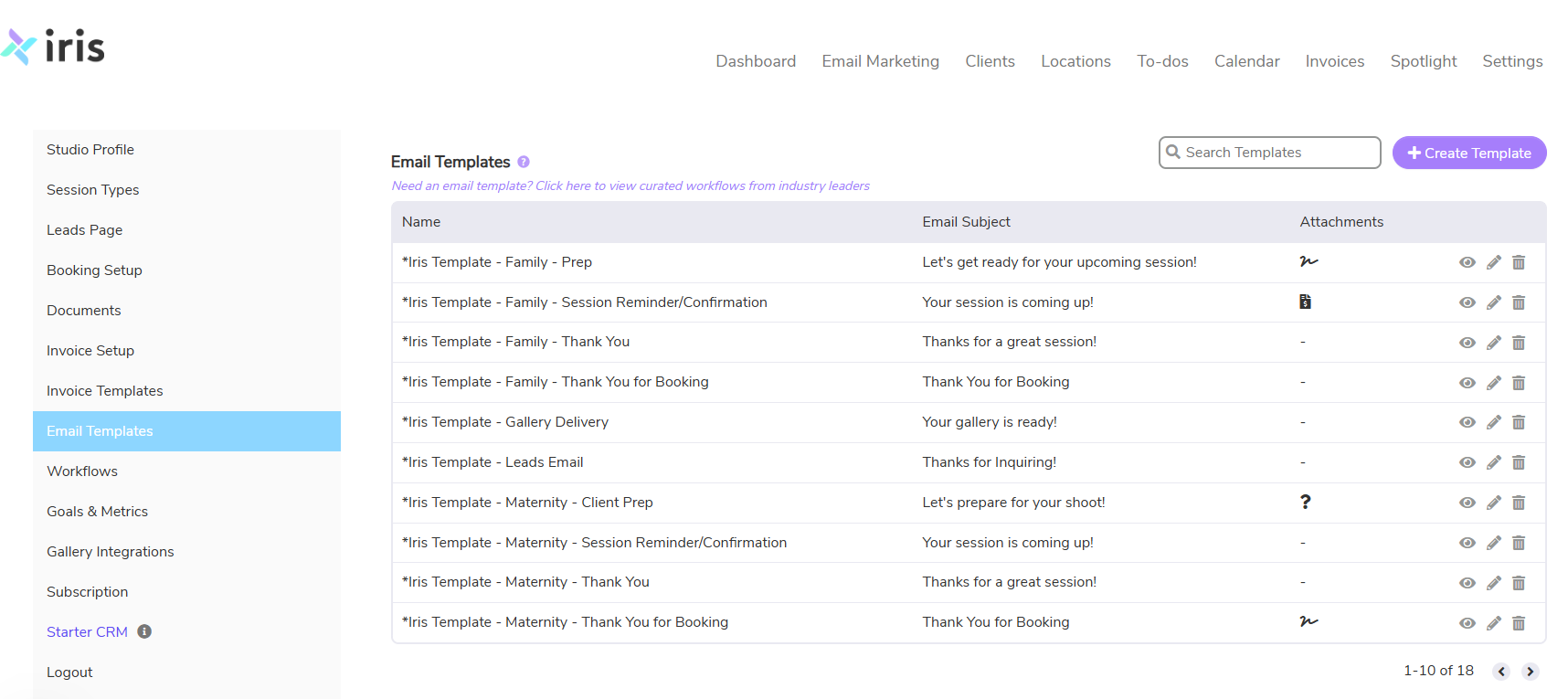
As you build out your email templates, organization becomes important. A well-organized template library lets you find and use the right message quickly, while a disorganized collection creates confusion and slows you down. Take the time to structure your templates logically so they support your workflow rather than complicate it.
Group your templates by stage of the client journey, from inquiry through delivery and follow-up. Label them clearly so you always know which template to reach for. As your business grows and you add new offerings or session types, expand your library thoughtfully rather than letting it become a cluttered jumble. A clean, well-maintained library is a genuine asset that saves time every single day.
It is also worth revisiting your templates periodically to keep them fresh and accurate. Pricing changes, offerings evolve, and your voice may shift over time. A quick review before each busy season ensures your templates reflect your current business and still sound like you. Iris Works lets you build, organize, and maintain your templates in one place, so your communication stays sharp, consistent, and easy to manage throughout every season.
Connect Templates to Triggers for True Automation
Templates save enormous amounts of time on their own, but their full power is unlocked when they are connected to automated triggers. A template sitting in a folder still requires you to remember to send it. A template connected to a trigger sends itself at exactly the right moment without any effort from you.
Think about each template and the moment it should be sent. The inquiry response should trigger the instant a lead reaches out. The confirmation should send when a client books. The prep guide should go out a few days before the session, and the reminder a day before. The delivery message follows the gallery, and the follow-up comes after that. When each template is tied to its trigger, your entire communication sequence runs automatically.
This is the difference between templates that save you time and templates that run your business. Iris Works lets you connect your templates to triggers within automated workflows, so the right message reaches every client at the perfect moment. Your communication becomes both effortless and impeccably timed, delivering a polished experience throughout the fall while freeing you to focus on your photography.
Frequently Asked Questions
What email templates do photographers need most?
The essential templates are inquiry responses, booking confirmations, styling and preparation guides, session reminders, gallery delivery messages, and follow-ups.
How do templates save time during the fall?
Templates let you reuse polished messages instead of writing each email from scratch, which saves hours during a high-volume season and keeps your communication consistent.
Can templates be automated?
Yes. With Iris Works, you can connect templates to automated workflows so they are sent at the right moment, such as an inquiry response the instant a lead reaches out.
Will templates make my emails feel impersonal?
Not if they are written in your own voice. A good template is a warm, genuine starting point that you can lightly personalize, so clients still feel a personal connection.
Which template is most important for booking clients?
The inquiry response template is often the most important, since it creates the first impression and frequently determines whether a lead becomes a booked client.
Recent posts