

Running a photography business means managing far more than sessions and editing.
Most photographers spend a surprising amount of time communicating with clients. Responding to inquiries, sending pricing information, following up with leads, delivering prep guides, reminding clients about upcoming sessions, and checking in after delivery all take time.
At first, this may feel manageable.
But as your business grows, communication quickly becomes one of the biggest sources of stress. You are juggling multiple clients at different stages while trying to remember who needs what next. One inquiry needs a response. Another client still has not signed their contract. Someone else needs a reminder before their session tomorrow.
Without systems in place, it becomes overwhelming quickly.
This is where automation changes everything.
Iris Works helps photographers automate communication so their workflow stays organized while clients still receive a professional and personal experience.
Why Photography Client Management Needs Automation
Photography businesses are built on relationships, but maintaining those relationships takes consistent communication.
Clients expect quick responses and clear next steps. If communication feels delayed or inconsistent, it affects their confidence in your business.
The challenge is that photographers are often managing communication while also:
- Shooting sessions
- Editing galleries
- Marketing their business
- Handling scheduling
- Managing family and personal responsibilities
Trying to manually keep up with every email becomes difficult as your business grows.
This is why photography client management software is so valuable. Instead of relying entirely on memory and manual effort, automation helps keep communication moving consistently.
An automated response ensures that inquiries are acknowledged immediately, even if you are in the middle of a session or away from your computer. Clients feel taken care of, and you avoid losing momentum with potential bookings.
What Iris Email Automation Actually Does
Email automation allows communication to happen automatically based on specific actions or timelines.
Instead of manually sending every email, your workflow handles repetitive communication for you.
For example:
- A lead submits an inquiry form and instantly receives a response
- A booked client automatically receives a confirmation email
- A prep guide is sent before the session
- Reminder emails go out ahead of appointments
- Follow-up communication happens after gallery delivery
This creates a smoother experience for clients while significantly reducing administrative work behind the scenes.
The goal is not to remove the personal side of your business. It is to remove the repetitive work that consumes hours every week.

Why Fast Responses Matter So Much
One of the biggest factors in booking photography clients is response time.
Potential clients are often contacting several photographers at once. The photographer who responds quickly and professionally immediately creates confidence.
Without automation, fast responses can be difficult to maintain consistently. You may be:
- In a session
- Driving
- Editing
- Spending time with family
- Away from your inbox
Iris Works allows photographers to create automatic inquiry responses so leads receive communication immediately.
That quick acknowledgment helps keep inquiries warm while giving you time to respond personally later.
How Automation Improves the Client Experience
Many photographers worry that automation feels impersonal.
In reality, good automation improves the client experience because it creates consistency.
Clients appreciate:
- Clear communication
- Fast responses
- Organized processes
- Helpful reminders
- Knowing what happens next
Without systems, communication often becomes inconsistent depending on how busy you are.
With Iris Works, every client moves through a structured process. They receive the right information at the right time without needing to constantly follow up or ask questions.
That organization creates a more professional experience overall.
Setting Up Your First Iris Email Workflow
One of the biggest misconceptions photographers have is that automation is complicated.
In reality, most photographers can start with a very simple workflow.
The easiest place to begin is inquiry management.
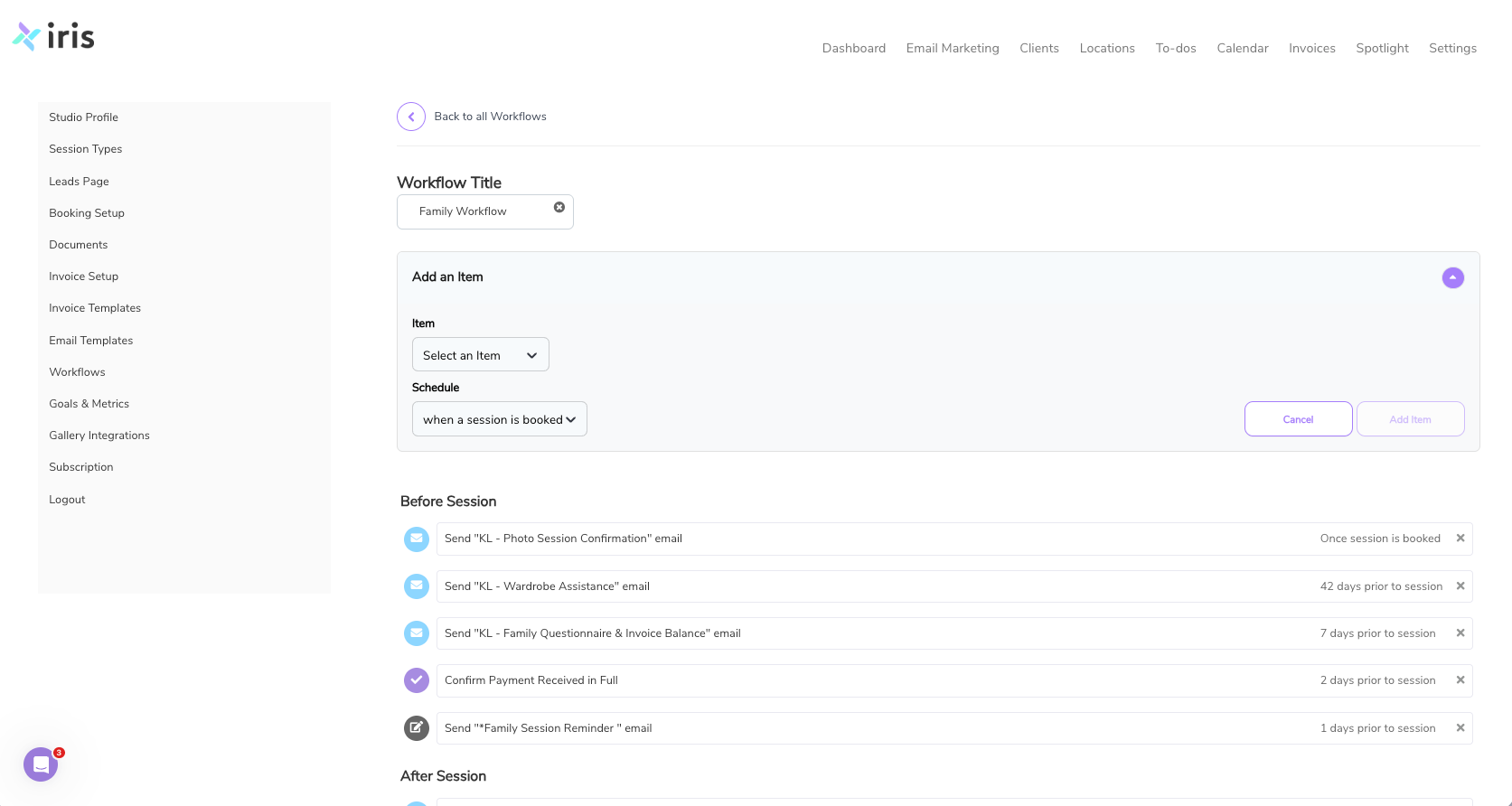
When someone fills out your contact form, your workflow can:
- Send an immediate thank-you email
- Deliver pricing or session information
- Let clients know when to expect a personal response
That one automation alone can improve response time dramatically.
From there, you can expand into additional workflows like:
- Booking confirmations
- Session reminders
- Prep guides
- Follow-up emails
You do not need to automate everything at once. Even small workflows create major time savings over time.
Why Email Templates Save So Much Time
Most photographers send similar emails repeatedly.
You are likely answering the same questions over and over:
- Pricing details
- What to wear
- Session expectations
- Delivery timelines
Writing these manually every single time takes far more time than most photographers realize.
Iris Works allows photographers to create reusable email templates that stay professional and consistent.
Instead of rewriting the same information repeatedly, you create the email once and reuse it whenever needed.
This not only saves time but also helps ensure your communication stays polished and organized.
Creating Workflows for Different Session Types
Different photography businesses require different workflows.
Wedding photographers often need:
- Timeline communication
- Vendor coordination
- Payment reminders
Family photographers may focus more on:
- Styling guides
- Seasonal reminders
- Mini session promotions
Branding photographers may need:
- Planning questionnaires
- Project preparation communication
- Delivery scheduling
Iris Works allows photographers to customize workflows around their actual business process instead of forcing every session type into the same system.
This flexibility makes automation far more practical.
Why Automation Helps Prevent Burnout
One of the biggest causes of burnout for photographers is not photography itself.
It is the constant administrative work behind the scenes.
The mental load of remembering:
- Who needs a response
- Which invoices are unpaid
- Which clients need reminders
- What tasks still need completed
Becomes exhausting over time.
Automation reduces that mental load significantly.
Instead of carrying every task yourself, your workflow supports your business consistently.
That allows photographers to:
- Spend less time in their inbox
- Reduce stress
- Focus more on photography
- Create healthier work-life balance
Sustainable businesses require sustainable systems.
How Iris Works Keeps Everything Connected
One of the biggest advantages of Iris Works is that communication is connected directly to your workflow.
Instead of using separate tools for:
- Inquiries
- Contracts
- Invoices
- Email communication
- Scheduling
Everything works together in one place.
This makes photography client management far more organized because every part of the client journey stays connected.
You are not piecing information together across multiple platforms or trying to remember what happens next manually.
Why Consistency Builds Trust
Clients notice when your process feels organized.
They notice:
- Fast communication
- Clear expectations
- Professional workflows
- Consistent follow-up
All of these things build trust.
A smooth process makes clients feel more confident working with you. It also increases the likelihood of referrals and repeat bookings because the experience feels reliable from beginning to end.
This is one of the biggest long-term benefits of automation. It helps create consistency across your business, even during busy seasons.
Automation Still Needs Personality
The best automated emails still sound human.
One mistake photographers sometimes make is creating overly robotic templates that feel generic or cold.
Your workflows should still reflect:
- Your personality
- Your tone
- Your brand experience
Automation should support your communication, not replace genuine connection.
The goal is to make your business feel more organized while still sounding like you.
Building a Photography Business That Feels Manageable
At the end of the day, automation is not really about technology.
It is about creating a photography business that feels easier to manage.
When communication is organized:
- Clients feel more supported
- Your workflow feels smoother
- Your business becomes easier to scale
Instead of constantly reacting to emails and reminders, your systems keep things moving consistently behind the scenes.
That changes how your business feels day to day.
Take the Next Step
If managing client communication feels overwhelming, it may be time to build stronger systems behind your business.
Use Iris Works to automate communication, organize workflows, and simplify photography client management from inquiry to delivery.
Start your free trial and see how email automation can help your business feel more organized, professional, and manageable.
Frequently Asked Questions
What is photography email automation?
Photography email automation uses workflows and templates to automatically send communication to clients throughout the booking process.
Will automation make my communication feel less personal?
No. Good automation improves consistency while still allowing your personality and brand voice to come through.
What emails should photographers automate first?
Most photographers start with inquiry responses, booking confirmations, reminders, and prep emails.
How does Iris Works help with photography client management?
Iris Works keeps inquiries, communication, workflows, contracts, invoices, and scheduling connected in one place.
Can I create different workflows for different session types?
Yes. Iris Works allows photographers to customize workflows for weddings, families, branding sessions, mini sessions, and more.
Recent posts