


Workflow Automation Can Feel Overwhelming — But It Doesn't Have to Be
Workflow automation can feel overwhelming when you do not know where to start. Many photographers assume automation means changing everything at once. That pressure often leads to doing nothing. The truth is, small steps make the biggest difference.
There's a particular kind of paralysis that comes with knowing you need to build better systems but not knowing where to begin. Every article about automation makes it sound comprehensive — like you need to map out your entire client journey, build a dozen workflows, and overhaul your process before you'll see any benefit. That framing is discouraging, and it's also wrong.
Automation doesn't require a complete transformation. It requires a starting point. One workflow, running reliably, creates immediate relief. That relief is motivating. Motivation leads to the next workflow, and then the next. The photographers with the most sophisticated systems didn't build them all at once — they started somewhere small and kept going.
Start With Tasks That Repeat Constantly
The best place to start is with the tasks that drain your energy every single week. Not the big, complex processes — the small, predictable, repetitive ones. The inquiry response you've written forty-seven times. The session reminder you set a calendar alert for every single shoot. The follow-up email you mean to send but sometimes forget.
These are the tasks that automation handles best, because they're consistent enough to systematize and frequent enough that the time savings show up immediately. Automating them creates relief that's noticeable from the very first week. And that relief builds momentum — the kind that makes it easier to tackle the next automation, and the one after that.

Start With Client Communication
Emails are one of the biggest time drains for photographers. Answering the same questions over and over adds up quickly. What's included in the package? How does booking work? What should I wear? When will I get my photos? These questions are completely reasonable — and completely predictable. Every client has some version of them, which means every client is waiting for the same information.
Automating common responses saves hours across a month without reducing the quality of the communication at all. In fact, it often improves it. When a response is written once, carefully, with complete information, it's almost always better than a quick reply typed between other tasks. Clients receive clear, consistent information every time. No one feels forgotten or left waiting. Consistent communication builds trust, and trust improves booking confidence — the kind that moves an interested inquiry toward a signed contract.
Automate the Steps Clients Expect
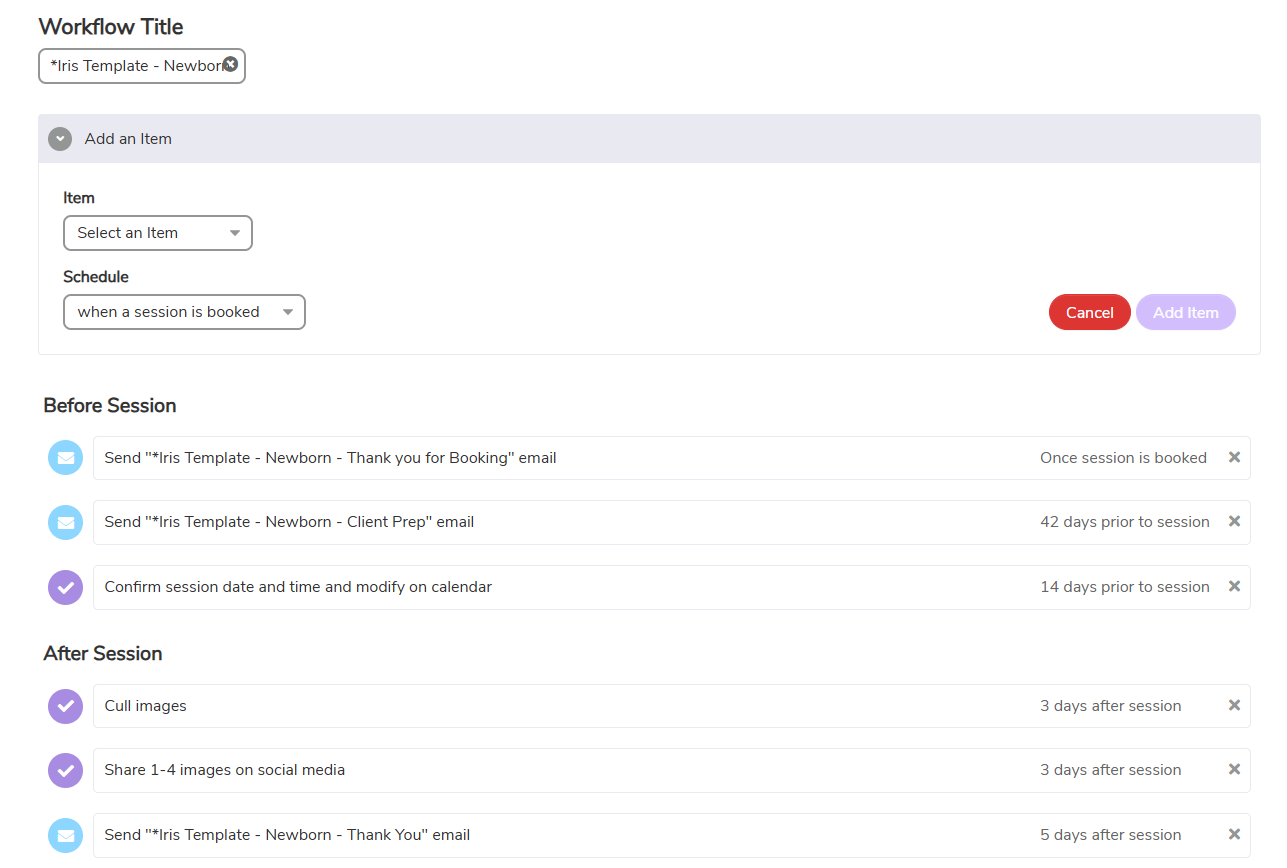
Clients arrive with certain expectations built in. They expect a confirmation when they book. They expect a reminder before their session. They expect clear next steps at every stage of the process. When these arrive automatically, the experience feels seamless and professional. When they don't arrive — or arrive late — clients feel uncertain. And uncertainty slows decisions.
That gap between what clients expect and what they receive is one of the most common places where bookings stall or trust erodes, and it's almost entirely preventable. Workflow automation ensures those expectations are met without requiring you to remember each one. The confirmation goes out the moment a booking is confirmed. The reminder triggers two days before the shoot. The next-steps email lands exactly when the client needs it.
Clients feel guided through the process rather than left to figure it out themselves. Guidance reduces anxiety. Reduced anxiety improves follow-through — on questionnaires, on payments, on showing up to the shoot ready rather than rattled.
Automate What Protects Your Time
Client communication is the most visible place to start, but contracts and payments are a close second and arguably more impactful. These are the steps where delays have real financial and legal consequences. A contract that goes out manually might sit in a draft folder for two days. An invoice that requires a back-and-forth before it's paid delays your cash flow and creates friction in a relationship that's still in its early stages.
Automating these steps removes both the delay and the awkwardness. The contract goes out automatically as soon as a booking is confirmed. The invoice follows immediately. The client knows exactly what's required of them and can complete both in a single step through a professional, branded portal. Clear requirements feel professional. They signal that you run a serious operation — which is exactly the impression you want to make before anyone has even seen your work.
Protecting your time protects your energy. Energy allows you to show up better — to shoots, to consultations, to the creative work that drew you to photography in the first place. Automation isn't just an efficiency tool; it's a sustainability tool.
How Iris Works Helps With Workflow Automation
With Iris Works, photographers can automate emails, contracts, and payments all within one platform. Workflows run in the background from the moment a client enters the system. Nothing is forgotten, delayed, or dependent on you remembering to trigger it manually.
The setup is designed to create structure without adding complexity. You build the workflow once — define the trigger, write the content, set the timing — and then it runs for every future client who moves through that stage of the process. The experience your clients have feels intentional and consistent, because it is. They move forward confidently, knowing exactly where they are and what comes next. That confidence benefits everyone: the client feels cared for, and you gain the mental space to focus on delivering great work.
Why Starting Small Works Best
You do not need to automate everything at once. The most effective approach is to pick the single most repetitive, most draining task in your current workflow and automate that one thing first. Just one. Starting with one workflow creates immediate clarity about what automation actually feels like in practice — and it almost always produces enough relief that the next step becomes obvious.
Clarity reduces stress. Reduced stress builds confidence. And confidence, in this context, is what makes the difference between photographers who build systems gradually over time and photographers who stay stuck in the planning phase indefinitely.
Workflow automation grows with your business naturally. Each process you automate gives time back — time that can go toward the next automation, toward creative work, toward the clients and projects worth pursuing. Time is one of your most valuable resources, and every hour reclaimed from a repetitive task is an hour that can be spent on something that actually moves the business forward.
Start with one. Build from there. The momentum will take care of the rest.
Frequently Asked Questions
Do I need to be technical to set up workflow automation for my photography business?
No. Modern photography business platforms like Iris Works are built specifically for creative professionals, not developers. Setting up a workflow typically means choosing a trigger (like "when a new booking is confirmed"), selecting which email template to send, and setting a timing offset if needed. The logic is visual and straightforward — if you can map out what you want to happen, you can build the workflow.
What's the single best workflow for a photographer to automate first?
The inquiry response is usually the highest-impact starting point. It's the moment where speed and professionalism matter most — clients often reach out to multiple photographers at once, and a fast, polished response creates an immediate advantage. An automated reply that acknowledges the inquiry, shares key information, and provides a clear next step can be set up in under an hour and will keep running for every future lead without any additional effort.
How long does it take to set up an automation workflow?
A single workflow — one trigger, one or two emails, one set of timing rules — typically takes under an hour to build, including writing the content. A complete client journey covering inquiry through post-delivery follow-up might take a few hours spread across a couple of sessions. Most photographers find that the upfront investment pays back within the first week of running, simply from the manual emails it replaces.
Will automated workflows send messages even when I'm actively managing a client relationship?
Most platforms let you control this. You can set conditions that pause or skip certain automations when you've already responded manually, or structure your workflows so they only cover the touchpoints you're not handling personally. Automation is meant to handle the predictable baseline — the confirmations, reminders, and follow-ups — not to replace genuine human conversation when that's called for.
What if my client journey isn't the same for every client?
Automation handles your standard process; you handle the variations. Most of what happens in a photography client relationship is predictable enough to systematize — the booking confirmation, the pre-session reminder, the gallery notification. When something falls outside that standard flow, you step in. Having the routine covered automatically actually makes it easier to give full attention to the situations that need it.
How does automating contracts and payments affect the client relationship?
It almost always improves it. When a contract and invoice arrive immediately after a booking decision, clients can complete everything while their enthusiasm is high. There's no waiting, no back-and-forth, no awkward follow-up asking whether they received the paperwork. The process feels decisive and professional, which reinforces the client's confidence in their decision to book. The relationship starts on a strong footing rather than a fumbled administrative one.
What happens if I set up an automation incorrectly?
Most platforms allow you to test workflows before they go live and to pause or edit them at any time. Starting with one workflow — rather than building an entire system at once — also limits the risk. If something isn't working as intended, it's easy to catch and correct before it affects a large number of clients. The iterative approach of building one automation at a time is both less overwhelming and less risky than trying to launch everything simultaneously.
Recent posts